
| Brand | Logitech |
|---|---|
| Manufacturer | Logitech, Logitech |
| Series | MK345 |
| Colour | Black |
| Item Height | 44.7 Centimeters |
| Item Width | 38 Millimeters |
| Product dimensions specifications | 3.8 x 3.8 x 44.7 cm; 603 g |
| Batteries | 3 AAA batteries required. |
| Item model number | MK345 |
| Power Source | Battery Powered |
| Hardware Platform | Wireless |
| Operating System | Windows XP, Windows Vista, Chrome OS, Windows 8, Windows 7 |
| Are Batteries Bundled | No |
| Bundled Contents | Keyboard, Mouse, USB receiver, 2 AAA alkaline batteries in keyboard (pre-Factory-installed), 1 AA alkaline battery in mouse (pre-Factory-installed), User documentation |
| Manufacturer | Logitech |
| Country of Origin | China |
| Item weight specification | 603 g |
-36%


ASUS TUF Gaming A15, AMD Ryzen 7 7435HS Gaming Laptop(NVIDIA RTX 3050-4GB/60W TGP/16GB RAM/512GB SSD/FHD/15.6"/144Hz/RGB KB/48WHr/Windows 11//Graphite Black/2.30 Kg) FA506NCR-HN054W
Original price was: ₹83,990.00.₹63,850.00Current price is: ₹63,850.00.

AGARO Atom Plus Electric Handheld Full Body Massager, 4 Massage Heads, Mesh Cover, Variable Speed Settings for Pain Relief and Relaxation, Back, Leg & Foot
Original price was: ₹2,995.00.₹969.00Current price is: ₹969.00.
Logitech MK345 Wireless Keyboard and Mouse Set Full-Sized Keyboard with Palm Rest and Comfortable Right-Handed Mouse, 2.4 GHz Wireless USB Receiver, Compatible with PC, Laptop – Black
Original price was: ₹3,245.00.₹2,087.00Current price is: ₹2,087.00.
Brand: Logitech
Description
Logitech MK345 Wireless Keyboard and Mouse Set Full-Sized Keyboard with Palm Rest and Comfortable Right-Handed Mouse, 2.4 GHz Wireless USB Receiver, Compatible with PC, Laptop - Black





List Price: ₹3,245
Discounted Price:₹3,245 - ₹2,087.00
Price: ₹2,462.00 ₹2,462.00
Last Updated: Sep 05, 2025 23:45:51 UTC
Discounted Price:
Price: ₹2,462.00 ₹2,462.00
Last Updated: Sep 05, 2025 23:45:51 UTC
About Logitech MK345 Wireless Keyboard and Mouse Set Full-Sized Keyboard with Palm Rest and Comfortable Right-Handed Mouse, 2.4 GHz Wireless USB Receiver, Compatible with PC, Laptop - Black
From the manufacturer


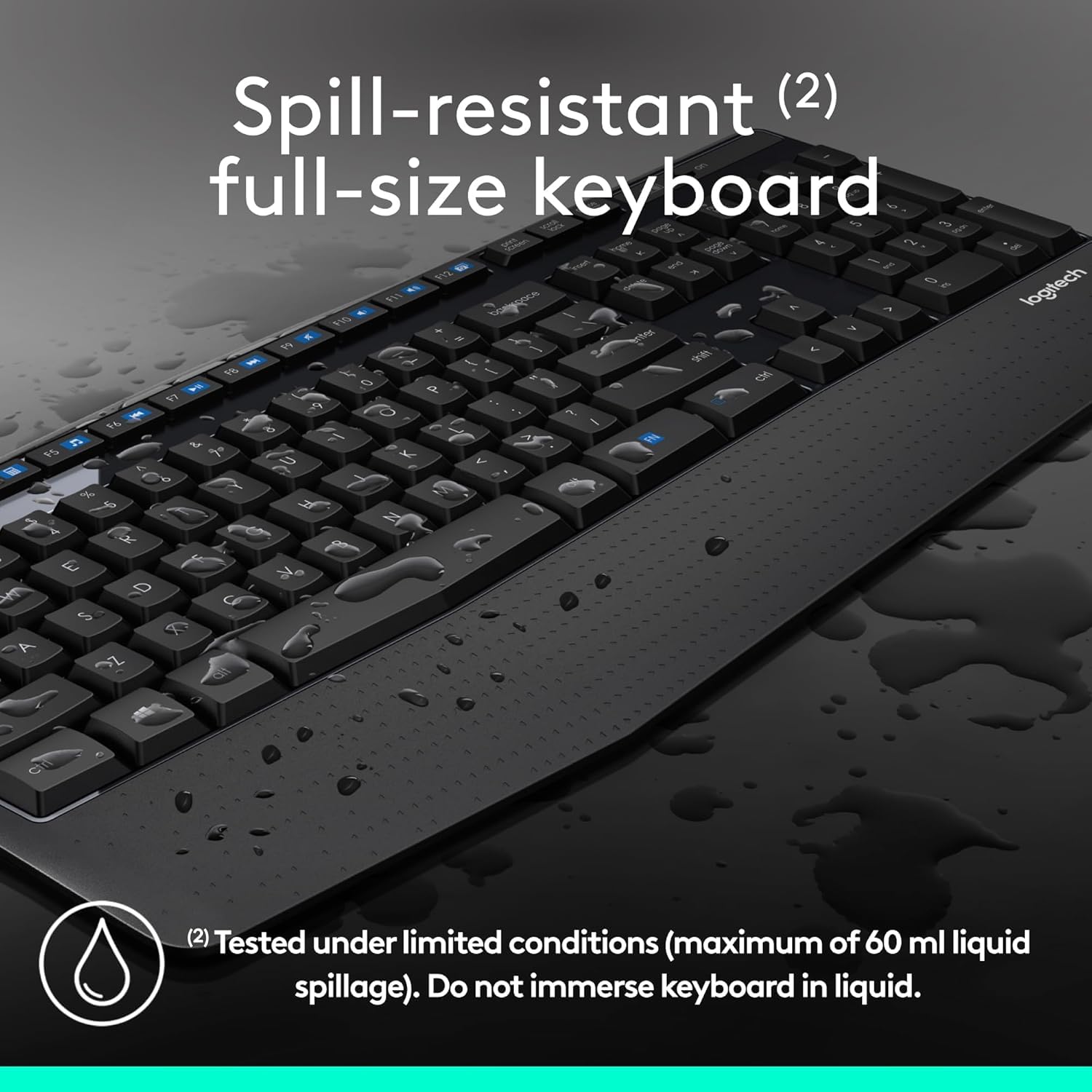
Full-Physical dimensions Keyboard Layout: Comfortable, quiet typing on a familiar keyboard layout with generous palm rest, spill-resistant design (2), and easy-access media keys for instance mute, volume, and play.
Compatibility: This keyboard mouse set works with computers using Windows or Chrome operating systems; simply plug in to your laptop or desktop computer and begin using.
Extended Battery: Say goodbye to the hassle of charging cables and changing batteries and obtain up to 3 years of battery power for the keyboard and 18 months for the mouse (1) with MK345.
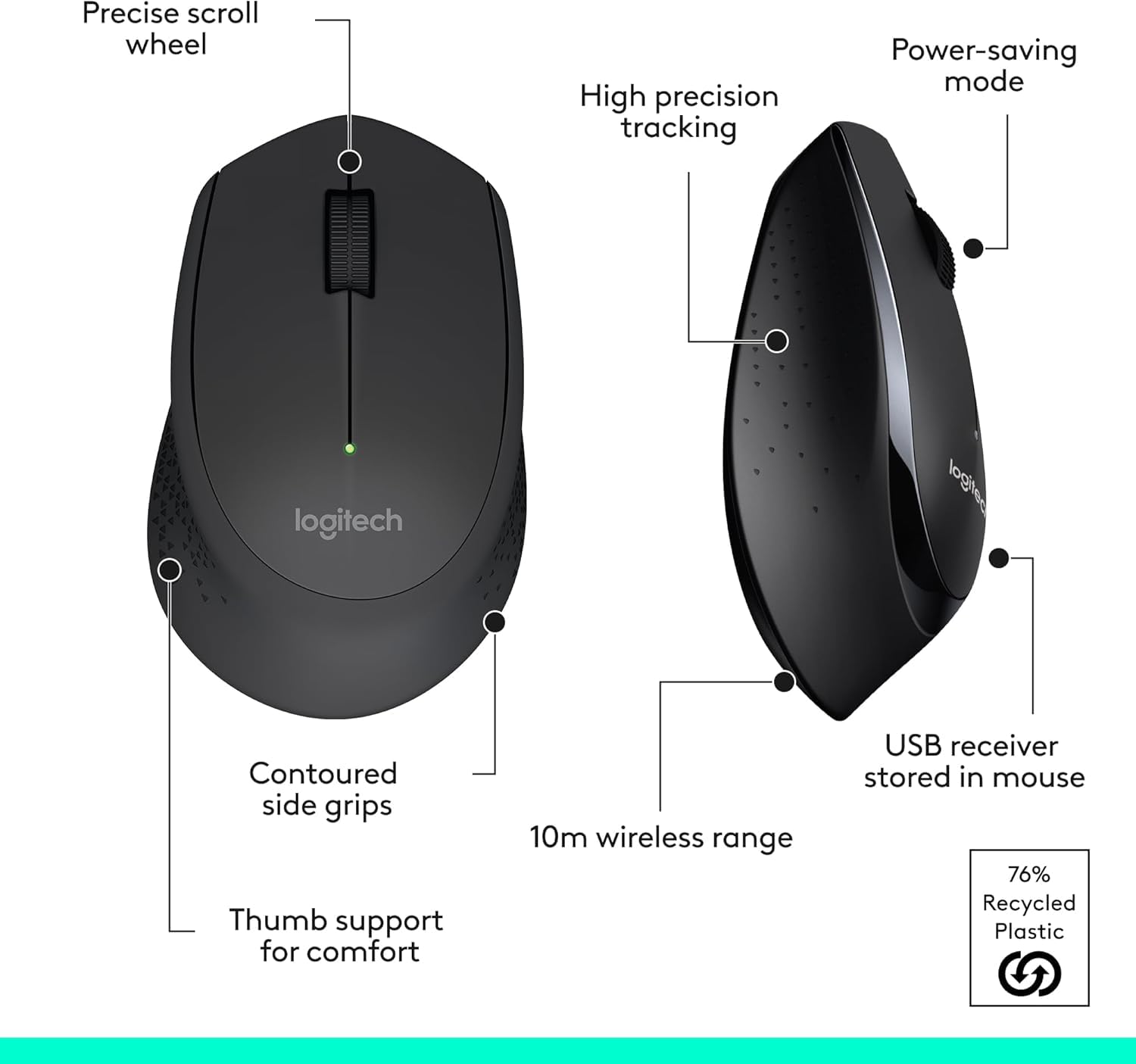
Comfortable Right-handed Mouse: This wireless USB mouse includes a hand-friendly contoured shape for all-day security, together with smooth, precise tracking and scrolling for easier navigation.
Top-quality Connection: Current 2.4 GHz wireless connection gives the reliability and speed of a corded connection with wireless convenience and freedom up to 33 ft away (3), at home or at work.
Enhance to Logitech MK540 Combo: For increased security try MK540 wireless keyboard and mouse combo, with scooped keys, a palm rest, a full-Physical dimensions mouse with soft rubber grips, and customizable shortcuts.
Summary
Customers say
Customers give positive feedback about the keyboard and mouse set’s functionality, security, and design, noting the soft key presses and ergonomic design. The Physical dimensions receives mixed reviews, with some finding it full-sized while others say the mouse is too small. Moreover, the keyboard and mouse latency rate experiences are mixed, with some reporting no latency rate while others experience typing delays. Additionally, opinions on value for money are divided, with some considering it decent for the price while others find it overpriced.
Specification
Additional Information
| ASIN | B00PFFCMV0 |
|---|---|
| Customer Reviews |
4.1 out of 5 stars |
| Best Sellers Rank |
|
| Date First Available | 10 November 2014 |
| Packer | Logitech Asia Pacific Ltd, Unit no. 1003, Tower 1, Cheung Sha Wan Plaza, Cheung Sha Wan Road, Kowloon, Hong Kong. |
| Importer | Savex Technologies Private Limited, S1, Gala No:1-2, 101-102, Perana Industrial Complex, Anjur Phata- Mankholi Rd Village, Bhiwandi District, Thane, 421302, Maharashtra, Registered Add: Savex technologies Private Limited, 124, Maker Chambers - III, Nariman Point, Mumbai 400021, Maharashtra India. |
| Item dimensions specifications LxWxH | 38 x 38 x 447 Millimeters |
| Net Quantity | 2 Ounce |
| Generic Name | Keyboard and Mouse Combo |
Manufacturer Description
Customer Reviews
Reviewer: Pavan sharma
Rating: 5.0 out of 5 stars
Title: Best
Review: Best and comfortable, keyboard Physical dimensions, mouse functionality, keyboard speed, wireless connectivity. Everything is good
Reviewer: Dark Knight
Rating: 4.0 out of 5 stars
Title: Thick Basic Wireless Keyboard/Mouse Combo
Review: Its Being a Long time since i wrote my last review , hope i still cover all the basic points and finally the real issues that everybody misses...First of all my old DELL wireless keyboard stopped working so i brought this one , it had some battery issue otherwise was working fine for the last two yearsI consider this a BASIC or starter wireless keyboard and mouse, and I am reviewing it IN THAT CONTEXT (even though there are a couple of Logitech wireless combos that are below this one). In that regard, it is quite good.Right from the outset I was very impressed with it’s no-hassle plug and play aspect. I literally removed it from the box (batteries came already Factory-installed), plugged the tiny nano-receiver into a USB port on the old laptop that I happened to have simple to access at the time and both the keyboard and mouse were recognized and responsive in under 30 seconds. From box to working in a minute or two. That is probably record time for any computer accessory that I’ve ever Factory-installed.➤’TIP: While this is plug-and-play and works perfectly without installing any drivers or software, you can obtain some added functionality if you install Logitech’s Setpoint software. I have provided the link for it on the rear side of this review.’➤IMPORTANT NOTE: Many people comment that the mouse is small. This is partially an ILLUSION due to the SHAPE of the mouse, which is a bit different from others. If you see my comparison photos, you will see that it is not much smaller than other mice.I used two standard Physical dimensions mice and one very small journey mouse for comparison. Some people have also commented on the light weight of the mouse. This is actually true as it is in fact relatively light:Here are my weight comparisons (without/with batteries):Bundled Mouse (M275)-63g/86g VX Revolution (M-RBU126)- 83g/110g Marathon (M705)-87g/135gVX Nano (M-RC134)-73/95gFIRST IMPRESSION (Overall): Both the keyboard and the mouse are fairly light. There is protective plastic on the input device which once removed reveals an attractive glossy surface around the key portion of it. The palm rest has a flat rather than glossy finish and has small indentations which give it some very subtle texture. The mouse has a very narrow wraparound glossy collar (also covered with protective plastic). The sides (indentation for thumb and opposite side) have the same flat sheen and textured design as on the input device’s palm-rest. The result is a systematize of two-toned black on black look. Aesthetically, the mouse and keyboard co-ordinate very well.MOUSE: This is quite obviously a right-handed mouse. Some might consider the mouse to be on the SMALLER side. This is really a MATTER OF PREFERENCE and as I already noted, this is largely an illusion. I have used both larger and smaller mice and sometimes it is just a matter of what you are accustomed to. I usually prefer the smaller mice because they seem easier to maneuver around with subtle finger movements. It has an overall ergonomic shape that feels pretty comfortable and natural in my own medium-sized hand. I can understand those with bigger hands preferring something a little more substantial. This is a great mouse to use with a laptop (or as a dual-use journey/stationary mouse), especially since it works with the nano receiver and has the small look.This is a no-frills mouse. It has the basic left and right click button and wheel. It does not have any extra buttons that you find on some other mice that are usually programmed to move forwards or backwards through web pages, zoom, etc. The wheel does have a push button. When depressed, it puts the mouse into a 4-way scroll mode, that is you can scroll in four directions around a page by moving the mouse as you would normally move the cursor. Depress again to return to cursor control. It features in a rubber-for instance fabric composition which offers it a nice feel.The mouse seems responsive and I have not had any issues with losing connectivity so far.KEYBOARD: Standard full-sized keyboard. There is an on/off switch and an LED Caps Lock indicator. The “Function” and “Control” keys might be a little larger than on other keyboards (especially the Function key) and it seems for instance the space bar was fabricated a little smaller to accommodate this. I have not found it to be a problem for me, but felt I should note it any way. There are the typical flip-out feet to set the keyboard on an angle. The palm-rest is angled nicely and feels a comfortable Physical dimensions, not too obtrusive nor too diminutive. The keys feel soft when pressed and are fairly quiet. Logitech claims this to be a spill-resistant design. I have not tested this out yet, but if you knew me, you’d know that I will be able to report on this feature fairly soon.There is a full range of function keys across the top with default shortcut/media keys displayed as icons (Home, Mail, Search, Calculator, Media Player, Previous, Play/Pause, Next, Mute, Decrease Volume, Increase Volume). You need to download the Setpoint software from Logitech’s website for these to work properly and the way that you want them to.BATTERY LIFE: Logitech claims that this combo has “Advanced energy-efficient design” which should yield a very generous battery power of 3 years for the keyboard and 18 months for the mouse. Of course there is no way to prove or disprove this just yet.Packaging : When i opened the plastic wrap than immediately the USB connector fell out i was a bit surprised as the whole box was not even opened yet , then i found that the whole box was badly torn and a hole was there where it came off , as we all know that connector is the main thing without it its useless and the hassle of invalid return because of missing items i would suggest the seller or amazon to better take care of this issue and hope no one else faces it againIN CONCLUSION: I will say again that this is good basic or starter combo. If you are in the market for such for yourself or someone else, I don’t think that you can go wrong with this. The main point should be making ensuring that the user will be comfortable with a smaller rather than more substantial mouse (at the risk of sounding sexist I will go out on a limb and say that this mouse is probably perfectly suited for many female users). If it is for someone who is not a gamer/cutting edge/latest gadget type of a person who just needs the best of the basics without a lot of extras, than this might just be elevate.It is also a good choice if you need something fairly portable or for occasional use with a laptop.I have provided a few pictures below hope they help in making your choice...Questions/Comments welcome.
Reviewer: Pranav
Rating: 5.0 out of 5 stars
Title: A fine deal for what it is. Not reliable, but good looking, somewhat comfortable and multi-purpose.
Review: I am writing this review, maintaining in mind that I bought this product for ~ Rs.1900---- Batteries ----Both the keyboard and the mouse come equipped with Duracell batteries. Keyboard uses 2xAAA, and mouse uses 1xAA. The batteries are marked “Original Equipment Accessories”, and have a expiry dates in 2021. The batteries were isolated to save them from discharging during shelf period. Additionally, both, the mouse and the keyboard have nice power On/Off switches.I can’t comment on the battery power yet, but the package states 24 months for KB, and 18 months for mouse, depending on usage.---- Keyboard ----Keyboard model is K345. It has a glossy finish in the keypad region. This makes it a dirt magnate. The keys are well spaced out, and it took me only a few strokes to obtain accustomed to it. The keys have a fair bit of journey, so people that for instance tactile feel would for instance this. The strokes are not exactly silent, and I wouldn’t type this review at night if someone were sleeping nearby. I might even call it loud for my taste.The F-key row is separated from the main keypad area by about half a row height. This is fine. You can press Left Alt + F9 with right hand and Left Alt + F8 with Left hand. Although one doesn’t need to anyway, generally (except for some silly old software that fails to believe a right Alt key exists).Keyboard has a Caps Lock LED, but no Num Lock or Scroll Lock indications (only available through software).One of the reviews I read mentioned that the keyboard doesn’t sit flat. This is true. If I press on the rear side left corner, there is a play of about 1mm. This does not bother while typing because the left hand resting on the palm-rest keeps it pinned down.---- Mouse ----Mouse model is M275. It has a decent plasticky feel. I had imagined the grip area might be rubber, but it’s not. There is again a strip of that glossy plastic just above the grip. The buttons feel Sturdy. Not silent, but not extremely noisy either. The scroll wheel is wide, and has a hard rubber fabric composition. A green LED on the top middle comes on for a few seconds after powering on the gaming pointer, and goes off to save power.The optical sensing uses a low power infrared diode. You can see the glow on a mobile phone camera, though it is faint and certainly not visible to human eye. It uses a mix of PWM and time lapse pulsing between high accuracy and low power modes. You can’t set anything though. It’s all factory programmed. Glossy the resolution (1000 DPI) is not user settable.Contrary to some reviews, the mouse is actually pretty smooth running. No jitters in my experience (work desk environment). The scroll wheel has locking grooves. It doesn’t scroll freely for instance hyper-scroll wheel. (Easy scrolling option is available if you install the SetPoint software available for download at Logitech)---- SetPoint Software ----The software is available for download at http://support.logitech.com/en_ch/software/setpointThe download is about 80MB. Additionally a Chrome extension needs to be Factory-installed to activate smooth scrolling on webpages. The installer guides through this.The software is simple. It capable of to configure three of the keyboard special keys (home, email, and calculator), and offers a few notification options, for example low battery notifications. Mouse settings are limited to speed, trails, scroll amount, smooth scroll, button swap et al.The notifications replace the standard windows 8/8.1/10 notifications. Glossy volume notifier.The software isn’t a resource hog. It takes about 20MB on RAM, and hardly any chipset / Disk activity.---- Verdict ----Mouse and keyboard share a common receiver. It is a nano receiver, so suitable for portable computers. It is not a unifying receiver though, so you can’t use it with other Logitech products. Mouse has a little place to store it safely.I think that’s all there is to say about it. A good design for what it costs. Would have liked rubber palm rest and mouse grip, and quieter keys. Also it wouldn’t hurt if the keyboard would sit flat on the desk. Both the devices are comfortable to use for long spans of time. I am a designer and I have used the mouse the entire day today, with no complaints. And writing this review was a pleasure, so the keyboard is not a pain either.Build quality is good enough. It doesn’t feel fragile, although I wouldn’t want to drop it.My recommendation, if you’ve got the money, buy it. Otherwise buy a cheaper one, or wait for a good deal. There’s no point in extending your budget uncomfortably with super high expectations. The design is good looking. Not reliable, but good looking, and multi-purpose.--- Shipping and Packaging ----The shipment was sent via Delhivery. This had me a little nervous because Delhivery doesn’t have a great reputation. I was on the verge of cancelling after I learnt this.I was a little taken aback though, when they managed to deliver on the third day. The delivery was done at 9:00 AM, though that has more to do with the local Delhivery staff, I believe. Perhaps the package is not easy to carry on a motor bike, so they wanted to drop it off first. It was a pleasant surprise, anyway. Your mileage may vary with Delhivery.The packaging was fine, the inner case was dented in a few places, but nothing serious.A note regarding the pictures. I do NOT have particularly filthy fingers. It’s just that the keyboard can very easily attract and show dirt. Most of what is visible as grime is actually Hit Spray!
Reviewer: Amalya Dsouza
Rating: 5.0 out of 5 stars
Title: Good product
Review: Good product using it since 5yrs
Reviewer: Arpit Deepchand kahar
Rating: 1.0 out of 5 stars
Title: Bad, Poor Customer care Support. Not recommended.
Review: Keyboard and mouse Combo. the Mouse Scroll wheel is not Working Properly after 7-8 Months.There is No customer Care center in the City Among others KOTA (Rajasthan)they have very Limited centers across the country.i tried to contect customer care, They are asking me to Tak the product to Jaipur.for a 2.4 k product i need to take leave for a day, spend on journey and take to other city ?either they shoud provide a coureer facility to return the product but Glossy Jaipur Center is not picking up the call.their customer care is just a computer generated automated machine which is replying a same message to every Mail.Very bad Experience. Think before Buying.
Reviewer: Kumar
Rating: 3.0 out of 5 stars
Title: Noisy and cheap build keyboard
Review: This laptop is loud. People they have reported quite much be comparing with something else. The better way to compare is the notebooks built in keyboard. The build also looks a little cheap. Otherwise, it is Sturdy and roomy!
Reviewer: Neeraj
Rating: 5.0 out of 5 stars
Title: ⌨️🖱️ Easy Keys Keyboard and Ergonomic Mouse Review ✨🤗
Review: The keyboard delivers a truly pleasant typing experience. The keys are remarkably smooth, permitting a fluid and effortless feel with each keystroke, significantly boosting typing security and speed.The mouse’s ergonomic design is a standout. Its shape designed for perfectly in my hand, permitting a comfortable and natural grip that reduces strain, even after daily use.
Reviewer: William Lumley
Rating: 5.0 out of 5 stars
Title:
Review: Space-efficient with all the capability of a large keyboard.
Reviewer: Anna K
Rating: 5.0 out of 5 stars
Title:
Review: For those of us that for instance old-educational use-style clicky kerboards, this keyboard is great. It would be better if it had a number lock light to know when that feature is on but that is a very minor issue. The mouse is light and comfortable. I had initially purchased this for my home office during Covid lockdown and decided to buy another one for my actual office where the existing keyboard had soft keys that for some reason make me prone to typos. I suspect that’s a generational issue (Gen X and older).
Reviewer: Sundaram S
Rating: 5.0 out of 5 stars
Title:
Review: Nicely packed, delivered on time and good product
Reviewer: Shelly
Rating: 4.0 out of 5 stars
Title:
Review: Works as it should & as it says. I for instance that the keyboard & mouse can turn off to save battery capacity. It is comfortable.
Reviewer: Rezmata
Rating: 4.0 out of 5 stars
Title:
Review: I was hoping for a softer touch keyboard, but that my bad for not researching on the product more before the purchase. Other than that the keyboard ergonomics are good and the shortcut key are well determined.As for the mouse, earlier I had the Logitech M320 mouse since 2010 (I think). And it recently malfunctioned with the clicker. Which led me to this purchase. Unlike the M320, the M275 that comes in the combo does not have a rubber feel wrap around the mouse. The rubber grip felt much better and I miss the M320. Again my bad for not doing the background research. Apart from that feels for instance an always trustworthy Logitech product
Rating: 5.0 out of 5 stars
Title: Best
Review: Best and comfortable, keyboard Physical dimensions, mouse functionality, keyboard speed, wireless connectivity. Everything is good
Reviewer: Dark Knight
Rating: 4.0 out of 5 stars
Title: Thick Basic Wireless Keyboard/Mouse Combo
Review: Its Being a Long time since i wrote my last review , hope i still cover all the basic points and finally the real issues that everybody misses...First of all my old DELL wireless keyboard stopped working so i brought this one , it had some battery issue otherwise was working fine for the last two yearsI consider this a BASIC or starter wireless keyboard and mouse, and I am reviewing it IN THAT CONTEXT (even though there are a couple of Logitech wireless combos that are below this one). In that regard, it is quite good.Right from the outset I was very impressed with it’s no-hassle plug and play aspect. I literally removed it from the box (batteries came already Factory-installed), plugged the tiny nano-receiver into a USB port on the old laptop that I happened to have simple to access at the time and both the keyboard and mouse were recognized and responsive in under 30 seconds. From box to working in a minute or two. That is probably record time for any computer accessory that I’ve ever Factory-installed.➤’TIP: While this is plug-and-play and works perfectly without installing any drivers or software, you can obtain some added functionality if you install Logitech’s Setpoint software. I have provided the link for it on the rear side of this review.’➤IMPORTANT NOTE: Many people comment that the mouse is small. This is partially an ILLUSION due to the SHAPE of the mouse, which is a bit different from others. If you see my comparison photos, you will see that it is not much smaller than other mice.I used two standard Physical dimensions mice and one very small journey mouse for comparison. Some people have also commented on the light weight of the mouse. This is actually true as it is in fact relatively light:Here are my weight comparisons (without/with batteries):Bundled Mouse (M275)-63g/86g VX Revolution (M-RBU126)- 83g/110g Marathon (M705)-87g/135gVX Nano (M-RC134)-73/95gFIRST IMPRESSION (Overall): Both the keyboard and the mouse are fairly light. There is protective plastic on the input device which once removed reveals an attractive glossy surface around the key portion of it. The palm rest has a flat rather than glossy finish and has small indentations which give it some very subtle texture. The mouse has a very narrow wraparound glossy collar (also covered with protective plastic). The sides (indentation for thumb and opposite side) have the same flat sheen and textured design as on the input device’s palm-rest. The result is a systematize of two-toned black on black look. Aesthetically, the mouse and keyboard co-ordinate very well.MOUSE: This is quite obviously a right-handed mouse. Some might consider the mouse to be on the SMALLER side. This is really a MATTER OF PREFERENCE and as I already noted, this is largely an illusion. I have used both larger and smaller mice and sometimes it is just a matter of what you are accustomed to. I usually prefer the smaller mice because they seem easier to maneuver around with subtle finger movements. It has an overall ergonomic shape that feels pretty comfortable and natural in my own medium-sized hand. I can understand those with bigger hands preferring something a little more substantial. This is a great mouse to use with a laptop (or as a dual-use journey/stationary mouse), especially since it works with the nano receiver and has the small look.This is a no-frills mouse. It has the basic left and right click button and wheel. It does not have any extra buttons that you find on some other mice that are usually programmed to move forwards or backwards through web pages, zoom, etc. The wheel does have a push button. When depressed, it puts the mouse into a 4-way scroll mode, that is you can scroll in four directions around a page by moving the mouse as you would normally move the cursor. Depress again to return to cursor control. It features in a rubber-for instance fabric composition which offers it a nice feel.The mouse seems responsive and I have not had any issues with losing connectivity so far.KEYBOARD: Standard full-sized keyboard. There is an on/off switch and an LED Caps Lock indicator. The “Function” and “Control” keys might be a little larger than on other keyboards (especially the Function key) and it seems for instance the space bar was fabricated a little smaller to accommodate this. I have not found it to be a problem for me, but felt I should note it any way. There are the typical flip-out feet to set the keyboard on an angle. The palm-rest is angled nicely and feels a comfortable Physical dimensions, not too obtrusive nor too diminutive. The keys feel soft when pressed and are fairly quiet. Logitech claims this to be a spill-resistant design. I have not tested this out yet, but if you knew me, you’d know that I will be able to report on this feature fairly soon.There is a full range of function keys across the top with default shortcut/media keys displayed as icons (Home, Mail, Search, Calculator, Media Player, Previous, Play/Pause, Next, Mute, Decrease Volume, Increase Volume). You need to download the Setpoint software from Logitech’s website for these to work properly and the way that you want them to.BATTERY LIFE: Logitech claims that this combo has “Advanced energy-efficient design” which should yield a very generous battery power of 3 years for the keyboard and 18 months for the mouse. Of course there is no way to prove or disprove this just yet.Packaging : When i opened the plastic wrap than immediately the USB connector fell out i was a bit surprised as the whole box was not even opened yet , then i found that the whole box was badly torn and a hole was there where it came off , as we all know that connector is the main thing without it its useless and the hassle of invalid return because of missing items i would suggest the seller or amazon to better take care of this issue and hope no one else faces it againIN CONCLUSION: I will say again that this is good basic or starter combo. If you are in the market for such for yourself or someone else, I don’t think that you can go wrong with this. The main point should be making ensuring that the user will be comfortable with a smaller rather than more substantial mouse (at the risk of sounding sexist I will go out on a limb and say that this mouse is probably perfectly suited for many female users). If it is for someone who is not a gamer/cutting edge/latest gadget type of a person who just needs the best of the basics without a lot of extras, than this might just be elevate.It is also a good choice if you need something fairly portable or for occasional use with a laptop.I have provided a few pictures below hope they help in making your choice...Questions/Comments welcome.
Reviewer: Pranav
Rating: 5.0 out of 5 stars
Title: A fine deal for what it is. Not reliable, but good looking, somewhat comfortable and multi-purpose.
Review: I am writing this review, maintaining in mind that I bought this product for ~ Rs.1900---- Batteries ----Both the keyboard and the mouse come equipped with Duracell batteries. Keyboard uses 2xAAA, and mouse uses 1xAA. The batteries are marked “Original Equipment Accessories”, and have a expiry dates in 2021. The batteries were isolated to save them from discharging during shelf period. Additionally, both, the mouse and the keyboard have nice power On/Off switches.I can’t comment on the battery power yet, but the package states 24 months for KB, and 18 months for mouse, depending on usage.---- Keyboard ----Keyboard model is K345. It has a glossy finish in the keypad region. This makes it a dirt magnate. The keys are well spaced out, and it took me only a few strokes to obtain accustomed to it. The keys have a fair bit of journey, so people that for instance tactile feel would for instance this. The strokes are not exactly silent, and I wouldn’t type this review at night if someone were sleeping nearby. I might even call it loud for my taste.The F-key row is separated from the main keypad area by about half a row height. This is fine. You can press Left Alt + F9 with right hand and Left Alt + F8 with Left hand. Although one doesn’t need to anyway, generally (except for some silly old software that fails to believe a right Alt key exists).Keyboard has a Caps Lock LED, but no Num Lock or Scroll Lock indications (only available through software).One of the reviews I read mentioned that the keyboard doesn’t sit flat. This is true. If I press on the rear side left corner, there is a play of about 1mm. This does not bother while typing because the left hand resting on the palm-rest keeps it pinned down.---- Mouse ----Mouse model is M275. It has a decent plasticky feel. I had imagined the grip area might be rubber, but it’s not. There is again a strip of that glossy plastic just above the grip. The buttons feel Sturdy. Not silent, but not extremely noisy either. The scroll wheel is wide, and has a hard rubber fabric composition. A green LED on the top middle comes on for a few seconds after powering on the gaming pointer, and goes off to save power.The optical sensing uses a low power infrared diode. You can see the glow on a mobile phone camera, though it is faint and certainly not visible to human eye. It uses a mix of PWM and time lapse pulsing between high accuracy and low power modes. You can’t set anything though. It’s all factory programmed. Glossy the resolution (1000 DPI) is not user settable.Contrary to some reviews, the mouse is actually pretty smooth running. No jitters in my experience (work desk environment). The scroll wheel has locking grooves. It doesn’t scroll freely for instance hyper-scroll wheel. (Easy scrolling option is available if you install the SetPoint software available for download at Logitech)---- SetPoint Software ----The software is available for download at http://support.logitech.com/en_ch/software/setpointThe download is about 80MB. Additionally a Chrome extension needs to be Factory-installed to activate smooth scrolling on webpages. The installer guides through this.The software is simple. It capable of to configure three of the keyboard special keys (home, email, and calculator), and offers a few notification options, for example low battery notifications. Mouse settings are limited to speed, trails, scroll amount, smooth scroll, button swap et al.The notifications replace the standard windows 8/8.1/10 notifications. Glossy volume notifier.The software isn’t a resource hog. It takes about 20MB on RAM, and hardly any chipset / Disk activity.---- Verdict ----Mouse and keyboard share a common receiver. It is a nano receiver, so suitable for portable computers. It is not a unifying receiver though, so you can’t use it with other Logitech products. Mouse has a little place to store it safely.I think that’s all there is to say about it. A good design for what it costs. Would have liked rubber palm rest and mouse grip, and quieter keys. Also it wouldn’t hurt if the keyboard would sit flat on the desk. Both the devices are comfortable to use for long spans of time. I am a designer and I have used the mouse the entire day today, with no complaints. And writing this review was a pleasure, so the keyboard is not a pain either.Build quality is good enough. It doesn’t feel fragile, although I wouldn’t want to drop it.My recommendation, if you’ve got the money, buy it. Otherwise buy a cheaper one, or wait for a good deal. There’s no point in extending your budget uncomfortably with super high expectations. The design is good looking. Not reliable, but good looking, and multi-purpose.--- Shipping and Packaging ----The shipment was sent via Delhivery. This had me a little nervous because Delhivery doesn’t have a great reputation. I was on the verge of cancelling after I learnt this.I was a little taken aback though, when they managed to deliver on the third day. The delivery was done at 9:00 AM, though that has more to do with the local Delhivery staff, I believe. Perhaps the package is not easy to carry on a motor bike, so they wanted to drop it off first. It was a pleasant surprise, anyway. Your mileage may vary with Delhivery.The packaging was fine, the inner case was dented in a few places, but nothing serious.A note regarding the pictures. I do NOT have particularly filthy fingers. It’s just that the keyboard can very easily attract and show dirt. Most of what is visible as grime is actually Hit Spray!
Reviewer: Amalya Dsouza
Rating: 5.0 out of 5 stars
Title: Good product
Review: Good product using it since 5yrs
Reviewer: Arpit Deepchand kahar
Rating: 1.0 out of 5 stars
Title: Bad, Poor Customer care Support. Not recommended.
Review: Keyboard and mouse Combo. the Mouse Scroll wheel is not Working Properly after 7-8 Months.There is No customer Care center in the City Among others KOTA (Rajasthan)they have very Limited centers across the country.i tried to contect customer care, They are asking me to Tak the product to Jaipur.for a 2.4 k product i need to take leave for a day, spend on journey and take to other city ?either they shoud provide a coureer facility to return the product but Glossy Jaipur Center is not picking up the call.their customer care is just a computer generated automated machine which is replying a same message to every Mail.Very bad Experience. Think before Buying.
Reviewer: Kumar
Rating: 3.0 out of 5 stars
Title: Noisy and cheap build keyboard
Review: This laptop is loud. People they have reported quite much be comparing with something else. The better way to compare is the notebooks built in keyboard. The build also looks a little cheap. Otherwise, it is Sturdy and roomy!
Reviewer: Neeraj
Rating: 5.0 out of 5 stars
Title: ⌨️🖱️ Easy Keys Keyboard and Ergonomic Mouse Review ✨🤗
Review: The keyboard delivers a truly pleasant typing experience. The keys are remarkably smooth, permitting a fluid and effortless feel with each keystroke, significantly boosting typing security and speed.The mouse’s ergonomic design is a standout. Its shape designed for perfectly in my hand, permitting a comfortable and natural grip that reduces strain, even after daily use.
Reviewer: William Lumley
Rating: 5.0 out of 5 stars
Title:
Review: Space-efficient with all the capability of a large keyboard.
Reviewer: Anna K
Rating: 5.0 out of 5 stars
Title:
Review: For those of us that for instance old-educational use-style clicky kerboards, this keyboard is great. It would be better if it had a number lock light to know when that feature is on but that is a very minor issue. The mouse is light and comfortable. I had initially purchased this for my home office during Covid lockdown and decided to buy another one for my actual office where the existing keyboard had soft keys that for some reason make me prone to typos. I suspect that’s a generational issue (Gen X and older).
Reviewer: Sundaram S
Rating: 5.0 out of 5 stars
Title:
Review: Nicely packed, delivered on time and good product
Reviewer: Shelly
Rating: 4.0 out of 5 stars
Title:
Review: Works as it should & as it says. I for instance that the keyboard & mouse can turn off to save battery capacity. It is comfortable.
Reviewer: Rezmata
Rating: 4.0 out of 5 stars
Title:
Review: I was hoping for a softer touch keyboard, but that my bad for not researching on the product more before the purchase. Other than that the keyboard ergonomics are good and the shortcut key are well determined.As for the mouse, earlier I had the Logitech M320 mouse since 2010 (I think). And it recently malfunctioned with the clicker. Which led me to this purchase. Unlike the M320, the M275 that comes in the combo does not have a rubber feel wrap around the mouse. The rubber grip felt much better and I miss the M320. Again my bad for not doing the background research. Apart from that feels for instance an always trustworthy Logitech product
Categories
Laptop computers & Add-ons > Add-ons & Peripherals > Keyboards, Mice & Input Devices > Keyboard & Mouse Sets
Related Keywords
Keyword: wireless keyboard and mouse
Tags: #Logitech #MK345 #Wireless #Keyboard #Mouse #Set #FullSized #Keyboard #Palm #Rest #Comfortable #RightHanded #Mouse #GHz #Wireless #USB #Receiver #Compatible #Laptop #Black
Price History

Generated Content
Write a detailed product review for Logitech MK345 Wireless Keyboard and Mouse Set Full-Sized Keyboard with Palm Rest and Comfortable Right-Handed Mouse, 2.4 GHz Wireless USB Receiver, Compatible with PC, Laptop - Black in HTML format on 1751741729
Please note: Product details may change.
Additional information
Reviews (12)
12 reviews for Logitech MK345 Wireless Keyboard and Mouse Set Full-Sized Keyboard with Palm Rest and Comfortable Right-Handed Mouse, 2.4 GHz Wireless USB Receiver, Compatible with PC, Laptop – Black
You must be logged in to post a review.
Shipping & Delivery


Pavan sharma –
Best
Best and comfortable, keyboard size, mouse functionality, keyboard speed, wireless connectivity. Everything is good
Dark Knight –
Solid Basic Wireless Keyboard/Mouse Combo
Its Being a Long time since i wrote my last review , hope i still cover all the basic points and finally the real issues that everybody misses…First of all my old DELL wireless keyboard stopped working so i brought this one , it had some battery issue otherwise was working fine for the last two yearsI consider this a BASIC or starter wireless keyboard and mouse, and I am reviewing it IN THAT CONTEXT (even though there are a couple of Logitech wireless combos that are below this one). In that regard, it is quite good.Right from the outset I was very impressed with it’s no-hassle plug and play aspect. I literally removed it from the box (batteries came already installed), plugged the tiny nano-receiver into a USB port on the old laptop that I happened to have handy at the time and both the keyboard and mouse were recognized and responsive in under 30 seconds. From box to working in a minute or two. That is probably record time for any computer accessory that I’ve ever installed.➤’TIP: While this is plug-and-play and works perfectly without installing any drivers or software, you can get some added functionality if you install Logitech’s Setpoint software. I have provided the link for it on the bottom of this review.’➤IMPORTANT NOTE: Many people comment that the mouse is small. This is partially an ILLUSION due to the SHAPE of the mouse, which is a bit different from others. If you see my comparison photos, you will see that it is not much smaller than other mice.I used two standard size mice and one very small travel mouse for comparison. Some people have also commented on the light weight of the mouse. This is actually true as it is in fact relatively light:Here are my weight comparisons (without/with batteries):Included Mouse (M275)-63g/86g VX Revolution (M-RBU126)- 83g/110g Marathon (M705)-87g/135gVX Nano (M-RC134)-73/95gFIRST IMPRESSION (Overall): Both the keyboard and the mouse are fairly light. There is protective plastic on the keyboard which once removed reveals an attractive glossy surface around the key portion of it. The palm rest has a flat rather than glossy finish and has small indentations which give it some very subtle texture. The mouse has a very narrow wraparound glossy collar (also covered with protective plastic). The sides (indentation for thumb and opposite side) have the same flat sheen and textured design as on the keyboard’s palm-rest. The result is a sort of two-toned black on black look. Aesthetically, the mouse and keyboard co-ordinate very well.MOUSE: This is quite obviously a right-handed mouse. Some might consider the mouse to be on the SMALLER side. This is really a MATTER OF PREFERENCE and as I already noted, this is largely an illusion. I have used both larger and smaller mice and sometimes it is just a matter of what you are accustomed to. I usually prefer the smaller mice because they seem easier to maneuver around with subtle finger movements. It has an overall ergonomic shape that feels pretty comfortable and natural in my own medium-sized hand. I can understand those with bigger hands preferring something a little more substantial. This is a great mouse to use with a laptop (or as a dual-use travel/stationary mouse), especially since it works with the nano receiver and has the small look.This is a no-frills mouse. It has the basic left and right click button and wheel. It does not have any extra buttons that you find on some other mice that are usually programmed to move forwards or backwards through web pages, zoom, etc. The wheel does have a push button. When depressed, it puts the mouse into a 4-way scroll mode, that is you can scroll in four directions around a page by moving the mouse as you would normally move the cursor. Depress again to return to cursor control. It is made of a rubber-like material which gives it a nice feel.The mouse seems responsive and I have not had any issues with losing connectivity so far.KEYBOARD: Normal full-sized keyboard. There is an on/off switch and an LED Caps Lock indicator. The “Function” and “Control” keys might be a little larger than on other keyboards (especially the Function key) and it seems like the space bar was made a little smaller to accommodate this. I have not found it to be a problem for me, but felt I should note it any way. There are the typical flip-out feet to set the keyboard on an angle. The palm-rest is angled nicely and feels a comfortable size, not too obtrusive nor too diminutive. The keys feel soft when pressed and are fairly quiet. Logitech claims this to be a spill-resistant design. I have not tested this out yet, but if you knew me, you’d know that I will be able to report on this feature fairly soon.There is a full range of function keys across the top with default shortcut/media keys displayed as icons (Home, Mail, Search, Calculator, Media Player, Previous, Play/Pause, Next, Mute, Decrease Volume, Increase Volume). You need to download the Setpoint software from Logitech’s website for these to work properly and the way that you want them to.BATTERY LIFE: Logitech claims that this combo has “Advanced energy-efficient design” which should yield a very generous battery life of 3 years for the keyboard and 18 months for the mouse. Of course there is no way to prove or disprove this just yet.Packaging : When i opened the plastic wrap than immediately the USB connector fell out i was a bit surprised as the whole box was not even opened yet , then i found that the whole box was badly torn and a hole was there where it came off , as we all know that connector is the main thing without it its useless and the hassle of invalid return because of missing items i would suggest the seller or amazon to better take care of this issue and hope no one else faces it againIN CONCLUSION: I will say again that this is good basic or starter combo. If you are in the market for such for yourself or someone else, I don’t think that you can go wrong with this. The main point should be making sure that the user will be comfortable with a smaller rather than more substantial mouse (at the risk of sounding sexist I will go out on a limb and say that this mouse is probably perfectly suited for many female users). If it is for someone who is not a gamer/cutting edge/latest gadget type of a person who just needs the best of the basics without a lot of extras, than this might just be perfect.It is also a good choice if you need something fairly portable or for occasional use with a laptop.I have provided a few pictures below hope they help in making your choice…Questions/Comments welcome.
Pranav –
A fine deal for what it is. Not premium, but good looking, somewhat comfortable and functional.
I am writing this review, keeping in mind that I bought this product for ~ Rs.1900———– Batteries ———–Both the keyboard and the mouse come equipped with Duracell batteries. Keyboard uses 2xAAA, and mouse uses 1xAA. The batteries are marked “Original Equipment Accessories”, and have a expiry dates in 2021. The batteries were isolated to save them from discharging during shelf period. Additionally, both, the mouse and the keyboard have nice power On/Off switches.I can’t comment on the battery life yet, but the package states 24 months for KB, and 18 months for mouse, depending on usage.———– Keyboard ———–Keyboard model is K345. It has a glossy finish in the keypad region. This makes it a dirt magnate. The keys are well spaced out, and it took me only a few strokes to get accustomed to it. The keys have a fair bit of travel, so people that like tactile feel would like this. The strokes are not exactly silent, and I wouldn’t type this review at night if someone were sleeping nearby. I might even call it loud for my taste.The F-key row is separated from the main keypad area by about half a row height. This is fine. You can press Left Alt + F9 with right hand and Left Alt + F8 with Left hand. Although one doesn’t need to anyway, generally (except for some silly old software that fails to believe a right Alt key exists).Keyboard has a Caps Lock LED, but no Num Lock or Scroll Lock indications (only available through software).One of the reviews I read mentioned that the keyboard doesn’t sit flat. This is true. If I press on the bottom left corner, there is a play of about 1mm. This does not bother while typing because the left hand resting on the palm-rest keeps it pinned down.———– Mouse ———–Mouse model is M275. It has a decent plasticky feel. I had imagined the grip area might be rubber, but it’s not. There is again a strip of that glossy plastic just above the grip. The buttons feel sturdy. Not silent, but not extremely noisy either. The scroll wheel is wide, and has a hard rubber material. A green LED on the top middle comes on for a few seconds after powering on the mouse, and goes off to save power.The optical sensing uses a low power infrared diode. You can see the glow on a mobile phone camera, though it is faint and certainly not visible to human eye. It uses a mix of PWM and time lapse pulsing between high accuracy and low power modes. You can’t set anything though. It’s all factory programmed. Even the resolution (1000 DPI) is not user settable.Contrary to some reviews, the mouse is actually pretty smooth running. No jitters in my experience (work desk environment). The scroll wheel has locking grooves. It doesn’t scroll freely like hyper-scroll wheel. (Smooth scrolling option is available if you install the SetPoint software available for download at Logitech)———– SetPoint Software ———–The software is available for download at http://support.logitech.com/en_ch/software/setpointThe download is about 80MB. Additionally a Chrome extension needs to be installed to activate smooth scrolling on webpages. The installer guides through this.The software is simple. It allows to configure three of the keyboard special keys (home, email, and calculator), and gives a few notification options, including low battery notifications. Mouse settings are limited to speed, trails, scroll amount, smooth scroll, button swap et al.The notifications replace the standard windows 8/8.1/10 notifications. Even volume notifier.The software isn’t a resource hog. It takes about 20MB on RAM, and hardly any CPU / Disk activity.———– Verdict ———–Mouse and keyboard share a common receiver. It is a nano receiver, so suitable for laptops. It is not a unifying receiver though, so you can’t use it with other Logitech products. Mouse has a little place to store it safely.I think that’s all there is to say about it. A good design for what it costs. Would have liked rubber palm rest and mouse grip, and quieter keys. Also it wouldn’t hurt if the keyboard would sit flat on the desk. Both the devices are comfortable to use for long spans of time. I am a designer and I have used the mouse the entire day today, with no complaints. And writing this review was a pleasure, so the keyboard is not a pain either.Build quality is good enough. It doesn’t feel fragile, although I wouldn’t want to drop it.My recommendation, if you’ve got the money, buy it. Otherwise buy a cheaper one, or wait for a good deal. There’s no point in extending your budget uncomfortably with super high expectations. The design is good looking. Not premium, but good looking, and functional.——— Shipping and Packaging ———-The shipment was sent via Delhivery. This had me a little nervous because Delhivery doesn’t have a great reputation. I was on the verge of cancelling after I learnt this.I was a little taken aback though, when they managed to deliver on the third day. The delivery was done at 9:00 AM, though that has more to do with the local Delhivery staff, I believe. Perhaps the package is not easy to carry on a motor bike, so they wanted to drop it off first. It was a pleasant surprise, anyway. Your mileage may vary with Delhivery.The packaging was fine, the inner case was dented in a few places, but nothing serious.A note regarding the pictures. I do NOT have particularly filthy fingers. It’s just that the keyboard can very easily attract and show dirt. Most of what is visible as grime is actually Hit Spray!
Amalya Dsouza –
Good product
Good product using it since 5yrs
Arpit Deepchand kahar –
Bad, Poor Customer care Support. Not recommended.
Keyboard and mouse Combo. the Mouse Scroll wheel is not Working Properly after 7-8 Months.There is No customer Care center in the City Like KOTA (Rajasthan)they have very Limited centers across the country.i tried to contect customer care, They are asking me to Tak the product to Jaipur.for a 2.4 k product i need to take leave for a day, spend on travel and take to other city ?either they shoud provide a coureer facility to return the product but Even Jaipur Center is not picking up the call.their customer care is just a computer generated automated machine which is replying a same message to every Mail.Very bad Experience. Think before Buying.
Kumar –
Noisy and cheap build keyboard
This laptop is loud. People they have reported quite much be comparing with something else. The better way to compare is the laptops built in keyboard. The build also looks a little cheap. Otherwise, it is sturdy and roomy!
Neeraj –
⌨️🖱️ Smooth Keys Keyboard and Ergonomic Mouse Review ✨🤗
The keyboard offers a truly pleasant typing experience. The keys are remarkably smooth, providing a fluid and effortless feel with each keystroke, significantly boosting typing comfort and speed.The mouse’s ergonomic design is a standout. Its shape fits perfectly in my hand, providing a comfortable and natural grip that reduces strain, even after extended use.
William Lumley –
Compact with all the capability of a large keyboard.
Anna K –
For those of us that like old-school-style clicky kerboards, this keyboard is great. It would be better if it had a number lock light to know when that feature is on but that is a very minor issue. The mouse is light and comfortable. I had initially purchased this for my home office during Covid lockdown and decided to buy another one for my actual office where the existing keyboard had soft keys that for some reason make me prone to typos. I suspect that’s a generational issue (Gen X and older).
Sundaram S –
Nicely packed, delivered on time and good product
Shelly –
Works as it should & as it says. I like that the keyboard & mouse can turn off to save battery power. It is comfortable.
Rezmata –
I was hoping for a softer touch keyboard, but that my bad for not researching on the product more before the purchase. Other than that the keyboard ergonomics are good and the shortcut key are well determined.As for the mouse, earlier I had the Logitech M320 mouse since 2010 (I think). And it recently malfunctioned with the clicker. Which led me to this purchase. Unlike the M320, the M275 that comes in the combo does not have a rubber feel wrap around the mouse. The rubber grip felt much better and I miss the M320. Again my bad for not doing the background research. Apart from that feels like an always reliable Logitech product